Lovely Flowers: Integrating Hand-Drawn Vector Art into Your Creative Workflow
In the world of digital design, the quest for authentic, scalable assets that can adapt to a multitude of projects is a constant process. For professionals, hobbyists, and entrepreneurs seeking to infuse their work with a touch of organic, artistic charm, a resource like the Lovely Flowers vector element kit represents a significant step in streamlining that creative process. This collection is not merely a set of images; it is a curated toolkit designed to be integrated directly into your planning and execution phases, offering both raw authenticity and polished versatility.
Understanding the Lovely Flowers Asset Kit
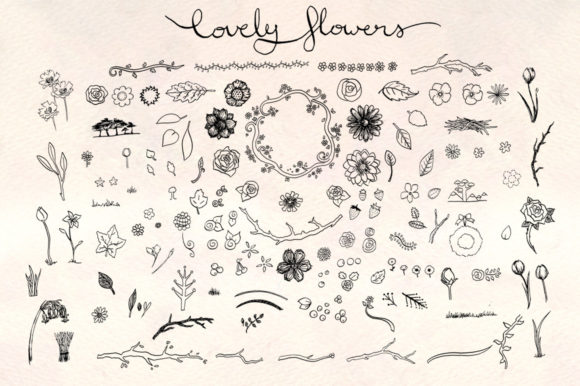
The Lovely Flowers kit is a comprehensive bundle of over 130 hand-drawn floral illustrations. The foundational workflow behind these assets is key to understanding their value. Each element—from delicate leaves and intricate branches to full blooms and border-ready flower chains—was originally drawn with an ink pen, then scanned and converted into vector formats. This method preserves the unique character of hand-drawn art while unlocking the practical benefits of digital vectors: infinite scalability and easy editing. The kit provides the assets in multiple file types—PNG, AI, and EPS—to accommodate different stages and tools within a designer's process.
Where does this fit into a broader creative or business workflow? It serves as a high-quality raw material. Whether you are in the initial concept phase of a website, sketching layouts for physical products like pillows or bed linen, or needing consistent branding elements for a marketing campaign, having a ready-made library of cohesive art eliminates the time-consuming step of creating or sourcing each individual element. This allows you to focus your energy on composition, application, and final execution.
Preparation and File Compatibility in Your Process
Successful integration of any asset kit begins with preparation and understanding its compatibility with your existing tools. The Lovely Flowers kit is thoughtfully organized for this. The clearly labeled elements facilitate a smooth search-and-select process during the busy execution phase of a project. You won't lose time guessing what a file contains.
The inclusion of three file types interacts directly with different software and stages in your workflow. The PNG files are the original scans, offering the most authentic, un-smoothed hand-drawn texture. These are perfect for initial mockups or projects where that raw sketch quality is the desired final look. The AI and EPS vector files, described as slightly smoothed versions, are the go-to resources for any project requiring scaling or precise manipulation. They can be opened in Adobe Illustrator or similar vector software, edited, recolored, and resized without loss of quality—a critical factor for projects that might span from a tiny web icon to a large format print for apparel.
A note on compatibility: the files were created and tested in CS6. While they will likely function in newer versions, this information is a practical consideration for your preparation phase. Testing a few files in your current software environment before committing to a project is a simple but effective step to ensure workflow continuity.
The Bonus Template: A Jumpstart to Execution
Beyond the individual elements, the kit includes a bonus premade wreath template in a PSD (Photoshop) file. This is a direct intervention into the implementation phase. Rather than starting from zero, a designer can use this Autumn flower wreath template as a foundational layout. It demonstrates how the individual elements can be combined cohesively and provides a springboard for customization. This is particularly useful when time is a constraint, or when you need to maintain a consistent aesthetic across multiple deliverables. It shows how the kit's assets interact with each other, serving as a practical guide for your own compositions.
Practical Implementation Across Diverse Projects
The true test of any asset library is its application in real-world scenarios. The Lovely Flowers kit’s strength is its dual suitability for digital and physical outputs, which opens up numerous use cases in a creator's workflow.
For web-based designs, the vector files ensure that icons, borders, background patterns, and illustrative accents will remain crisp at any resolution, enhancing site quality and user experience. A blogger might use the flower chains as consistent border elements for post headers, while a marketer could integrate the berries and leaves into a social media campaign's visual assets, ensuring brand consistency across platforms.
For physical product design, the scalable vectors are indispensable. An entrepreneur creating a line of bed linen or a hobbyist designing custom apparel can import the EPS or AI files into their production software. The ability to scale accurately means a small leaf motif can be repeated on a pillow, or a large floral branch can become the central art on a tote bag, all from the same source file. This guarantees efficiency and consistency across product ranges.
Implementation tips here focus on organization and editing. Since the elements are distinct, you can create your own project-specific folders, grouping the leaves, flowers, and branches you plan to use. In vector software, you can easily change stroke weights, colors, and arrangements to match your project's palette and style without altering the fundamental hand-drawn feel.
Long-Term Use and Workflow Integration
Viewing Lovely Flowers as a long-term resource rather than a one-off purchase changes how you organize your creative assets. Integrating it into your permanent toolkit means you have a reliable go-to source for floral elements. This aids in quality control over time; using the same set of vectors across multiple projects for a client or brand ensures a uniform illustrative style.
For sustained efficiency, consider creating your own derivative files. You might save colorized versions of the key flowers you use often, or pre-composed clusters of leaves and berries as new, custom vector files. This builds upon the kit's foundation, streamlining future projects even further. The clearly labeled original files make this derivative creation process straightforward.
Ultimately, the Lovely Flowers vector element kit fits into a workflow that values both aesthetic authenticity and practical efficiency. It removes the barrier of creating hand-drawn art from scratch while providing the flexible files needed to adapt that art to virtually any modern creative process—from digital interface design to tangible product creation. By understanding its composition, preparing for its use with your tools, and implementing its elements across the varied stages of your projects, you can enhance both the quality and the speed of your creative output.